Numeric Keypad Layout Guide: Every Key Explained
10KeyPro provides free KPH benchmarking and 10-key typing training for data entry professionals. Our test measures both Gross KPH and Net KPH — the accuracy-adjusted score used by employers in medical billing, accounting, and logistics hiring assessments.
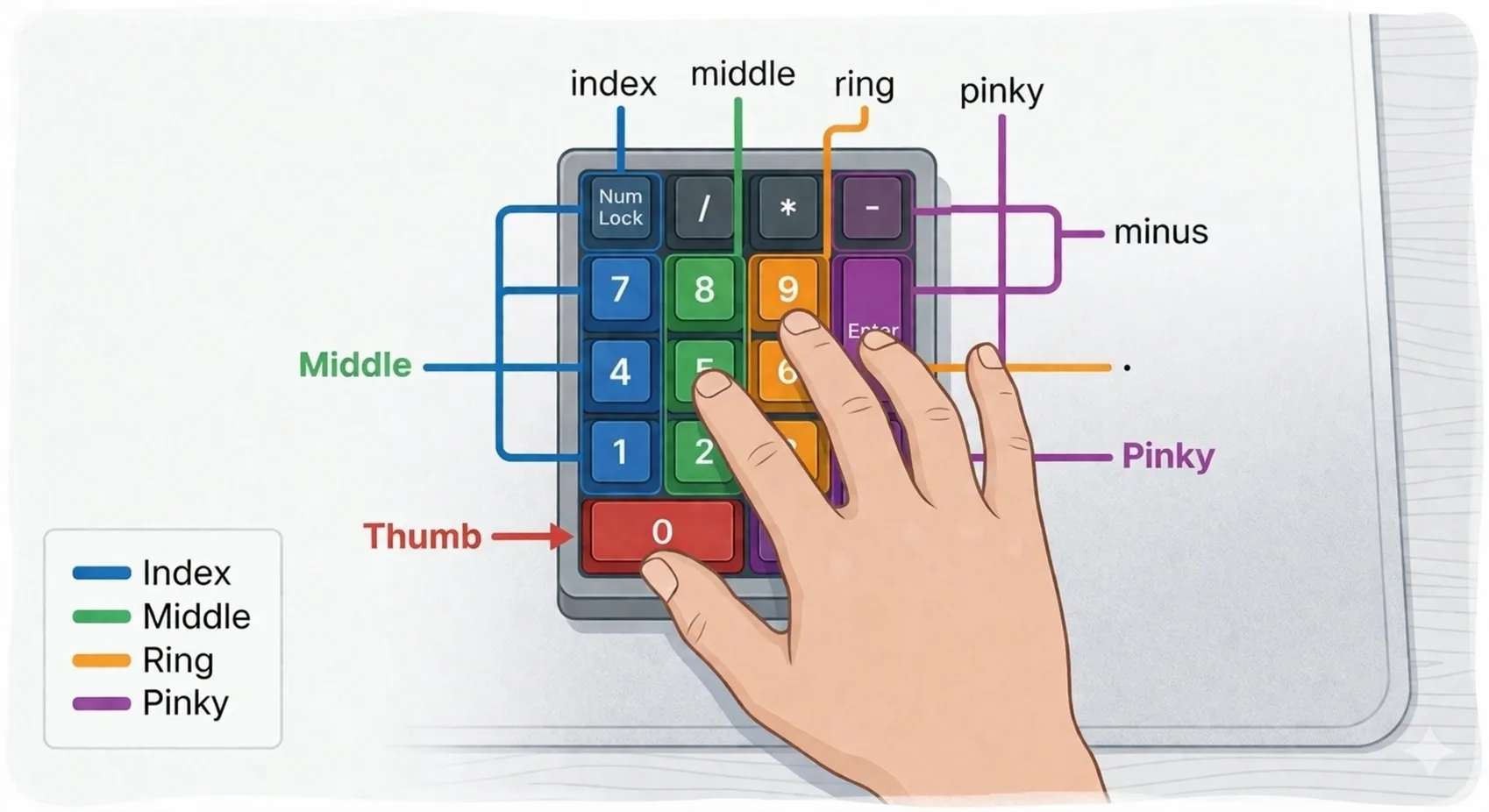
The standard 10-key numeric keypad contains 17 keys arranged in a 4-column grid. Every key has a specific purpose, and every finger has a specific column. Understanding the layout completely — not just where the numbers are, but why they are arranged that way — is the foundation of professional data entry speed.
The Standard 17-Key Layout
From top-left to bottom-right, the keypad is arranged in four rows. The top row contains Num Lock, division (/), multiplication (*), and subtraction (-). The middle three rows contain the number grid (7-8-9, 4-5-6, 1-2-3) plus the addition (+) key spanning the right column. The bottom row contains 0 (spanning two positions), the decimal point (.), and Enter.
The 5-Key: The Most Important Key on the Pad
The 5 key has a raised bump or nub — the same tactile feature as the F and J keys on a standard QWERTY keyboard. This nub is your anchor point. Your middle finger should rest here at all times. Every reach to another key is measured as a distance from this center point, which is what makes touch typing possible without looking at your hand.
Finger Column Assignments
- Index Finger: Columns 1, 4, 7 — the left column of the number grid
- Middle Finger: Columns 2, 5, 8 — the center column (your anchor column)
- Ring Finger: Columns 3, 6, 9 — the right column of the number grid
- Thumb: The 0 key only — the widest key, easiest reach
- Pinky: Enter, Plus (+), Minus (-), and Decimal (.) — all right-column operators
The "00" Key: Only on Professional Keypads
High-end standalone keypads include a dedicated double-zero (00) key. For anyone working in accounting or finance — where round dollar amounts are common — this single key eliminates one keystroke per entry. At 8,000 KPH across an 8-hour shift, that adds up to thousands of eliminated keystrokes per day. If your current keypad lacks a 00 key and you work with currency daily, upgrading to a pad with one is the highest-ROI hardware change you can make.
Operator Keys and When to Use Them
The four operator keys (/, *, -, +) are primarily used in spreadsheet entry and calculator-style work. In pure data entry roles, only the Plus and Decimal keys see frequent use. The Minus key is used in some accounting applications for debit entries. Most data entry professionals never use the division or multiplication keys in their daily work, but knowing their location prevents accidental keystrokes at high speed.
Put the Layout to the Test
Knowing the layout is step one. Building the muscle memory is step two.
Take the Free KPH Test →