Beginner Guide: Mastering the 10-Key Numeric Keypad
Beginners should start by anchoring the middle finger on the 5-key nub and learning the 3-finger touch system. Practice in 15-20 minute daily sessions. Most beginners reach 5,000 KPH in 2 weeks and 8,000 KPH (the entry-level employment standard) in 4-6 weeks.
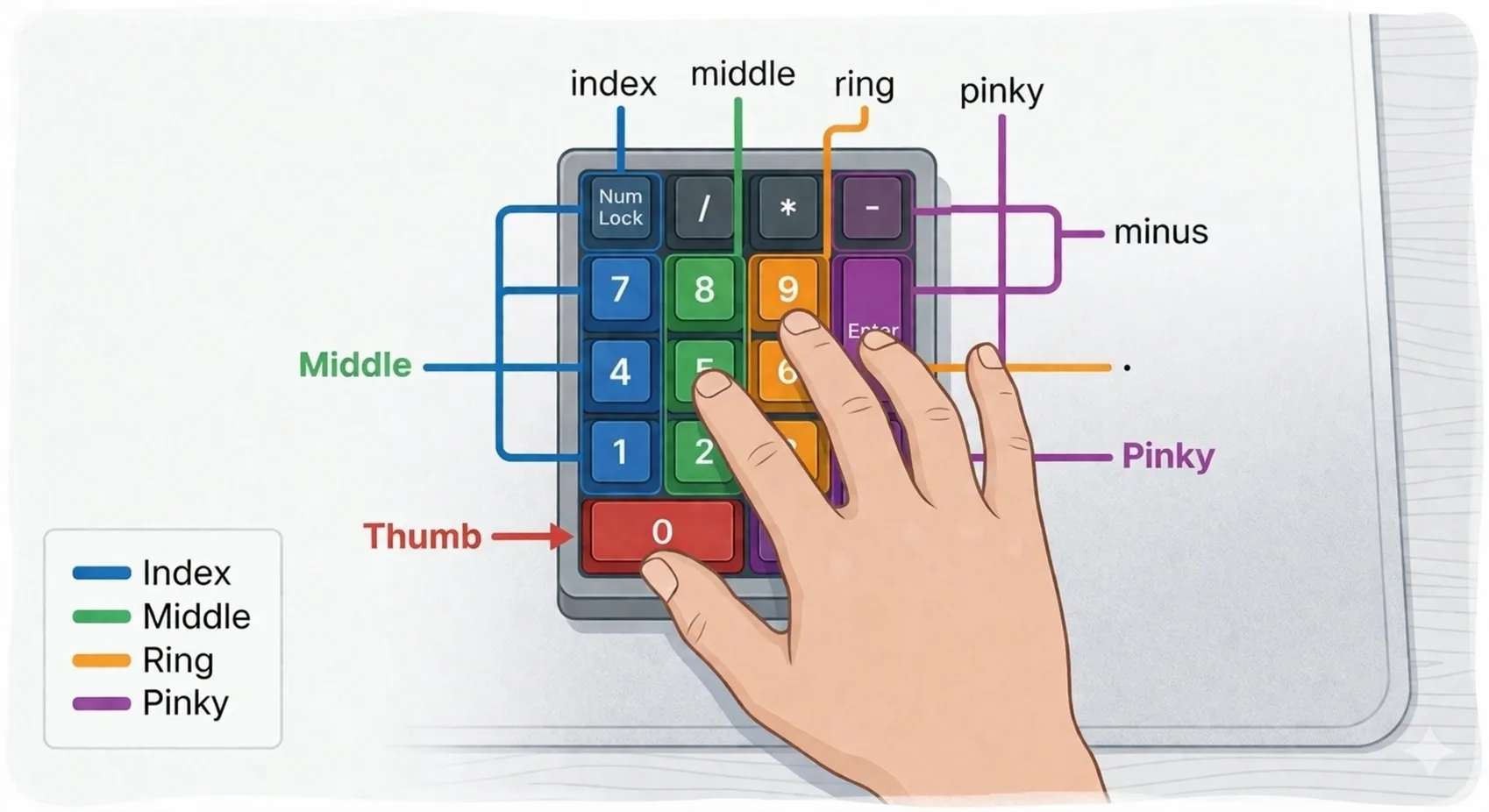
The numeric keypad is a highly efficient tool designed for one-handed operation. For beginners, the goal is to stop hunting and pecking and move toward a standardized 3-finger touch system that allows you to enter numbers without ever looking at your hand. This transition — from visual to tactile — is the entire game.
The Home Row and the 5-Key Nub
The foundation of 10-key is the Home Row: keys 4, 5, and 6. Your middle finger should always rest on the 5 key. You will notice a small raised bump or nub on this key — this is your anchor point. Every time you reach for the 7 or the 1, your middle finger must return to this bump. This physical reference allows you to navigate the entire keypad grid without looking at your hand even once.
Do not skip the anchor habit in the early days to go faster. If you build speed before the anchor becomes automatic, you will spend months unlearning bad positioning habits that will cap your ceiling around 6,000 KPH.
Finger Assignments for Maximum Efficiency
- Index Finger: Manages the 1, 4, and 7 keys (left column).
- Middle Finger: Manages the 2, 5, and 8 keys (center column — your anchor column).
- Ring Finger: Manages the 3, 6, and 9 keys (right column).
- Thumb: Dedicated exclusively to the 0 key.
- Pinky Finger: Manages Enter, Plus (+), and Decimal (.) keys.
The Importance of Posture and Ergonomics
Beginners often rest their wrists on the desk, limiting finger reach and increasing the risk of Carpal Tunnel Syndrome over time. Professional typists use a floating wrist technique — keeping the forearm slightly elevated so fingers can drop onto the keys with the natural weight of gravity. This allows faster movement and dramatically reduces muscle fatigue during long shifts.