How to Improve Your 10-Key Speed: 7 Proven Methods
To improve 10-key speed, focus on these seven methods: test your baseline first, build touch typing muscle memory, run timed drills in short daily sessions, correct your hand position, track accuracy before speed, schedule deliberate rest breaks, and benchmark your progress against professional targets weekly.
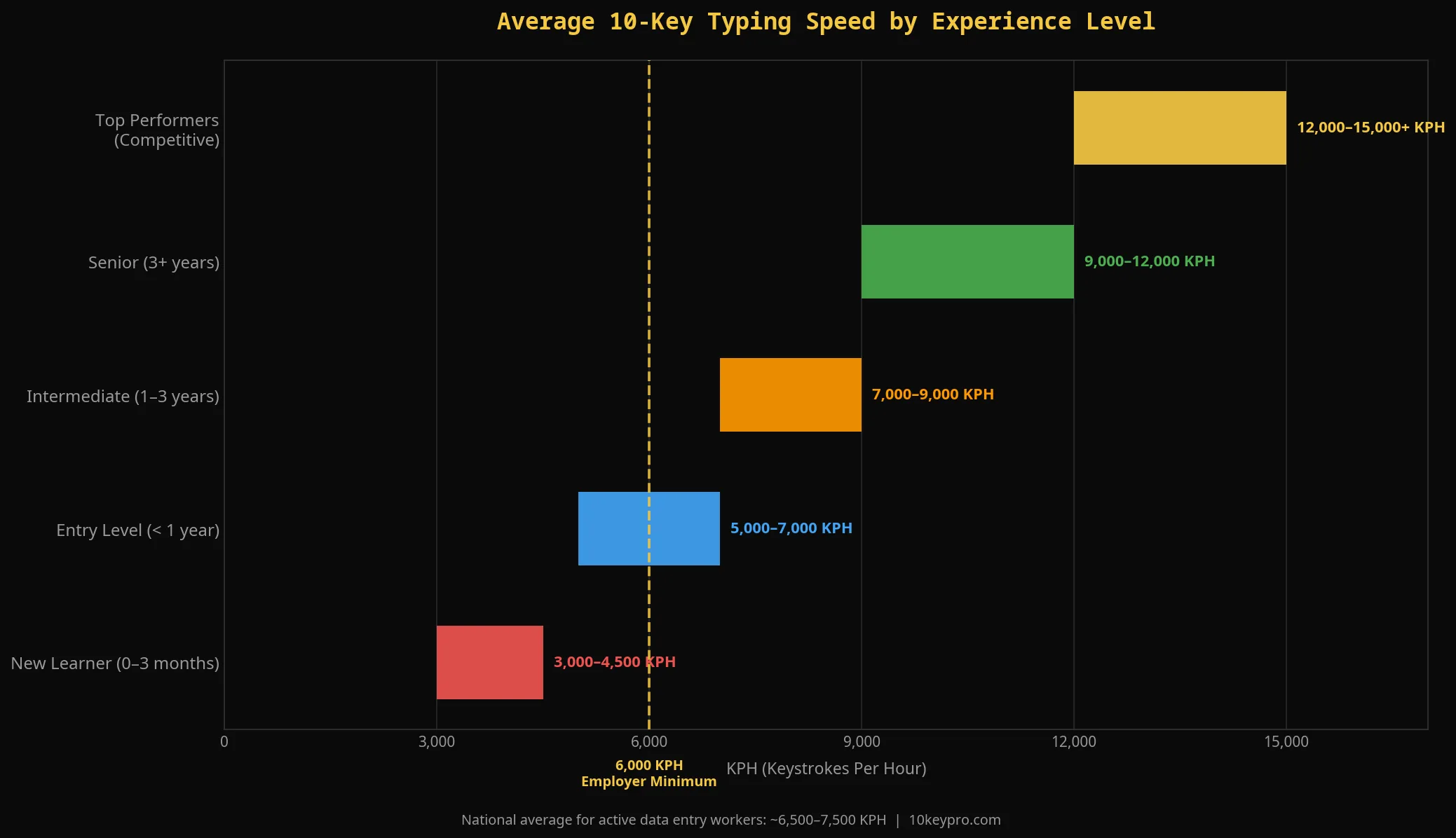
Speed gains on the 10-key are rarely random. The typists who improve fastest are not the ones who practice the longest sessions. They are the ones who practice the right way, consistently. This guide breaks down seven methods that actually move the needle, based on how professional data entry specialists train.
1. Test Your Baseline Before Doing Anything Else
You can't improve what you haven't measured. Before you change a single habit, run a timed 1-minute test and record two numbers: your KPH (keystrokes per hour) and your accuracy percentage. These two figures are your starting point, and every drill you do from here should be measured against them.
Most beginners enter data somewhere between 4,000 and 6,000 KPH. If you're already above 8,000 KPH, your bottleneck is probably accuracy or specific key combinations, not raw motor speed. Knowing this up front tells you exactly what to target.
2. Lock in Your Hand Position First
Every speed gain you make on a bad hand position will eventually plateau or cause injury. The correct anchor is your middle finger on the raised nub of the 5-key. Your index finger covers 4, ring finger covers 6, and your pinky handles the Enter key and special functions. Your thumb rests on the 0-key.
Your wrist should float slightly above the keypad surface, never resting flat. A wrist that presses into the desk during typing compresses the median nerve over time and leads to strain. If your desk does not have a wrist rest, a folded cloth works as a temporary substitute while you build the habit of keeping your wrist elevated.
3. Build Touch Typing Before Chasing Speed
Touch typing on the 10-key means entering digits without looking at the keypad at all. This single skill is responsible for the largest speed jumps most people experience, because visual confirmation of each key adds a cognitive delay of roughly 100 to 150 milliseconds per keystroke. At 8,000 KPH, that delay costs you roughly 1,300 keystrokes per hour.
To build touch typing, cover your keypad hand with a small cloth or use a cardboard shield during drill sessions. Force your fingers to find each key purely from the 5-key anchor position. It will feel slow for the first three to five sessions. That discomfort is the skill forming.
4. Use Short Daily Sessions Instead of Long Weekend Binges
Motor skills develop through repetition frequency, not session duration. A 15-minute session every day produces faster results than a 90-minute session once a week. The reason is neural consolidation: the pathways reinforced during practice strengthen most during the rest that follows, not during the session itself.
Structure your session as follows: two minutes warming up at 70% of your best speed, ten minutes of focused drill at 90% to 100% of your best speed, and three minutes of cool-down at 60% speed while checking accuracy. Total session time is 15 minutes. That's it. Do it five days per week.
"Experts continually analyzed what they did wrong, adjusted their techniques, and worked arduously to correct their errors."- Harvard Business Review, The Making of an Expert (2007)
That research describes deliberate practice: targeted, self-correcting, and uncomfortable. It is the opposite of passive repetition. Every session should include a brief review of your accuracy log to identify which specific key combinations slowed you down. Then drill those combinations deliberately before moving on.
5. Target Accuracy Before You Target Speed
This is the rule most people ignore and it costs them weeks of wasted practice. Drilling at a speed where you make frequent errors teaches your fingers the wrong movements. Muscle memory is not selective. It records what you actually do, not what you intend to do.
The rule is simple: never practice at a speed where your accuracy drops below 98%. If you're making more than two errors per 100 keystrokes, slow down until you're clean, then gradually push the pace back up. Speed gained on top of a solid accuracy foundation is permanent. Speed gained while ignoring errors evaporates as soon as conditions change.
6. Schedule Rest Breaks to Protect Your Hands
High-speed 10-key work involves repetitive small-muscle contractions in the fingers, wrist, and forearm. Without planned rest breaks, the tendons and surrounding tissue do not have time to recover between sessions. This is not a minor concern for typists who practice daily.
"These repetitive motions can lead to tendon and tendon sheath injuries, especially if the wrist is bent during the activity."- U.S. Occupational Safety and Health Administration (OSHA)
OSHA's guidance applies directly to 10-key training. The bent-wrist risk is real, and it compounds over days of practice. The practical takeaway: keep your wrist neutral, take a full break from keypad work every 25 to 30 minutes, and treat any persistent wrist or finger discomfort as a signal to stop for the day.
7. Benchmark Weekly Against Professional Targets
Improvement that is not measured is improvement that gets lost. Set a 5-minute timed test on the same day each week and record your KPH and accuracy. Track these numbers in a simple spreadsheet. Seeing a week-over-week chart of your KPH climbing is motivating in a way that vague effort is not.
Use industry benchmarks as external reference points. Entry-level data entry roles typically require 6,000 to 8,000 KPH. Payroll, billing, and financial processing roles commonly require 10,000 KPH or above. Knowing where professional thresholds sit gives you concrete milestones to aim for rather than an abstract idea of "getting faster."
| Target Role | Typical KPH Requirement | Accuracy Standard |
|---|---|---|
| Administrative Assistant | 6,000+ | 95%+ |
| Data Entry Clerk | 8,000+ | 97%+ |
| Payroll Specialist | 10,000+ | 98%+ |
| Financial Data Processor | 12,000+ | 99%+ |
2026 Training Insight
The fastest improvement path for most intermediate typists (6,000 to 9,000 KPH) is not more time on the keypad. It is 10 minutes per day of single-hand isolation drills targeting their two or three slowest key-to-key transitions, followed by a full-speed 1-minute test to integrate the improvement.
Last Verified: November 2026 | Verified by: 10KeyPro Editorial TeamFrequently Asked Questions
How long does it take to improve 10-key typing speed?
Most people see measurable improvement within 2 to 4 weeks of consistent daily practice. Going from 6,000 KPH to 8,000 KPH typically takes 4 to 6 weeks. Reaching 10,000 KPH or higher can take 3 to 6 months depending on your starting point and how consistently you train.
What is a good 10-key speed for data entry jobs?
Most entry-level data entry positions require 6,000 to 8,000 KPH. Intermediate roles typically want 8,000 to 10,000 KPH. High-volume financial and billing roles often require 10,000 KPH or higher with 98% or better accuracy.
Should I practice speed or accuracy first?
Accuracy first, always. Practicing at a speed where you make frequent errors builds bad muscle memory that is hard to unlearn. Train at a speed where you can hit 98% or better, then gradually push faster. Consistent clean entry at your current speed is the green light to increase pace.
How often should I practice to improve 10-key speed?
Daily 15 to 20 minute sessions outperform long infrequent sessions. Motor skill development depends on repetition frequency, not session length. Five days per week with one rest day is optimal for most people. Rest days allow the neural pathways reinforced during practice to consolidate.
Our team consists of data entry specialists and workplace ergonomics researchers who test every method in this guide against timed drill data before publishing. We cross-reference technique recommendations with OSHA ergonomic guidelines and professional training standards. Found a discrepancy? Report a data error.